Why Your AI Agent Keeps Failing After Week Two (And How to Fix It)
The pattern is consistent enough to have a name. Call it the two-week wall.
You set up an AI automation — a Claude CoWork workflow, a Zapier chain, an agent that handles your lead follow-up — and it works. For about two weeks, it works really well. Then something breaks. An API connection drops. The AI starts generating outputs that are slightly off. The workflow starts requiring manual fixes more often than it's saving time. You end up spending more time managing the automation than you would have spent just doing the task.
Most people conclude that AI automation doesn't work for their business. That conclusion is wrong. What actually happened is a predictable set of failure patterns that nobody warned them about before they started.
This guide explains what causes AI agents to fail in the first month, how to audit your current setup and how to build AI automation that's still running six months from now.
Why Week Two Is the Breaking Point
The first week of any new AI automation is a honeymoon period. You've just set it up. You're paying close attention to it. You notice when something's off and fix it immediately. The system appears to be working because you're actively managing it.
Week two is when you stop watching. You've got other things to do. The automation is supposed to run itself. This is the moment it reveals whether it was genuinely self-sufficient or whether it was working because you were compensating for its weaknesses in real time.
At the same time, the world has already changed slightly. A contact form on your website got a different field structure. An email template you use got updated and broke a variable the automation was pulling. A tool you connected got a minor update that changed its output format. None of these changes are dramatic — but they're enough to break a workflow that was working on day one.
The two-week wall isn't an AI problem. It's a systems problem. Any automated system — human or AI — that lacks monitoring and resilience will break when the environment changes. AI workflows just reveal this more visibly than other tools because they tend to fail silently, producing wrong outputs rather than obvious errors.
The 5 Failure Patterns
Understanding which pattern your system is hitting tells you exactly how to fix it.
Pattern 1: The Brittle Trigger
The automation depends on a very specific trigger condition that's easy to break. A Zap that fires when an email has a specific subject line. A CoWork workflow that starts when a file lands in a particular folder with a particular naming format. A CRM automation that depends on a field being filled in a specific way.
These work fine when the trigger conditions are consistent. They fail silently when anything upstream changes — a person uses a slightly different email subject, a form produces a different field name, a new team member saves files differently. The workflow stops running, nobody notices for three days and leads or tasks pile up.
The fix: Build triggers around stable signals, not brittle conditions. An email received from a domain is more stable than an email with a specific subject line. A file appearing in a folder is more stable than a file with a specific name. When a brittle trigger is unavoidable, add a daily monitoring check that alerts you if the automation hasn't fired in 24 hours.
Pattern 2: The Compounding Prompt
The AI's instructions were written for one specific context that no longer applies. You wrote a prompt in week one based on the emails or leads you were seeing at the time. By week three, the inputs have changed — different lead types, different copy, different formats — and the prompt is generating outputs that don't fit.
This is common in content and outreach automations. The first leads looked a certain way, so the personalization prompt was tuned for them. Now you're getting leads from a different source or industry and the AI is generating generic, slightly wrong responses that technically follow the instructions but miss the mark.
The fix: Write prompts that describe the goal, not the current context. "Write a personalized outreach email for this prospect based on their company, role and the pain point they've indicated" is more durable than a prompt that assumes specific lead characteristics. Review your active prompts every 30 days and update them based on what the AI is getting wrong.
Pattern 3: The Integration Debt
Every connection between tools is a potential point of failure. When you string together four or five tools — a form, a CRM, a Claude workflow, an email sender, a spreadsheet — you're creating integration debt. Each connection requires maintenance as tools update, change their APIs, or shift their output formats.
Most small business automation setups accumulate integration debt faster than they're maintained. You add a new step in month one, connect two more tools in month two and by month three you have a complex system with multiple single points of failure and no clear owner.
The fix: Use the minimum number of integrations needed to achieve the outcome. Every additional tool in the chain adds fragility. If you can do something inside one tool rather than connecting two, do it inside one. When integrations are necessary, document them: what connects to what, what the expected output is and what to check if it breaks.
Pattern 4: The Over-Automation Trap
This one is subtle. The automation starts doing things you didn't fully account for — sending emails that weren't quite right, generating content you wouldn't have approved, moving leads into stages they shouldn't be in. You set the automation to run on everything and trusted it too early.
Over-automation happens when you build for the ideal case and skip the approval layer. Instead of AI draft → human review → send, you went straight to AI draft → send. It works for a while because the AI is generating good outputs — until it doesn't and by then you've sent 40 emails you wouldn't have approved.
The fix: Keep humans in the loop for anything that represents your business externally. AI draft → human review → publish is always safer than fully autonomous output, at least in the first 90 days. Automate the generation, not the approval. Once you've reviewed 100 outputs and the quality is consistently high, then reduce oversight.
Pattern 5: The Silent Failure
The automation appears to be running but isn't producing results. No error messages, no broken workflows — just nothing happening. Leads not being followed up. Content not being generated. Reports not being sent. The system is technically operational but not actually doing the work.
Silent failures happen when the workflow runs but hits an edge case that produces no output rather than an error. The AI generates an empty response. The trigger fires but the condition check returns false. The email sends but to an address that bounced three weeks ago.
The fix: Build explicit success checks into every workflow. After a follow-up sequence fires, check that the email was actually delivered. After a content automation runs, check that the output file exists and has content. Add a weekly "system health" check where you manually verify that each automation ran at least once in the past seven days with a valid output.
How to Audit Your Current AI System
Before you fix anything, understand what you actually have. This takes about 30 minutes.
- List every automation: Write down every AI workflow currently running. Include the trigger, the tool, the output and the frequency. If you can't describe it clearly, that's a warning sign.
- Check the last run date: When did each automation last run? If you can't tell, that's the first problem. Every automation should have a visible last-run timestamp.
- Review 5 recent outputs per automation: Don't just check if it ran — check what it produced. Are the outputs actually good? Would you have approved them if you'd reviewed them manually?
- Map your integration chain: For any automation with more than two tools, draw the connection between each one. Identify where data passes between systems and what would break if any single connection failed.
- Identify what has no monitoring: Which automations could fail silently for three days without you noticing? Those are your highest priority fixes.
The Stability Framework: Build → Test → Lock → Monitor
Sustainable AI automation follows a four-stage process. Most setups skip the last three stages and wonder why things break.
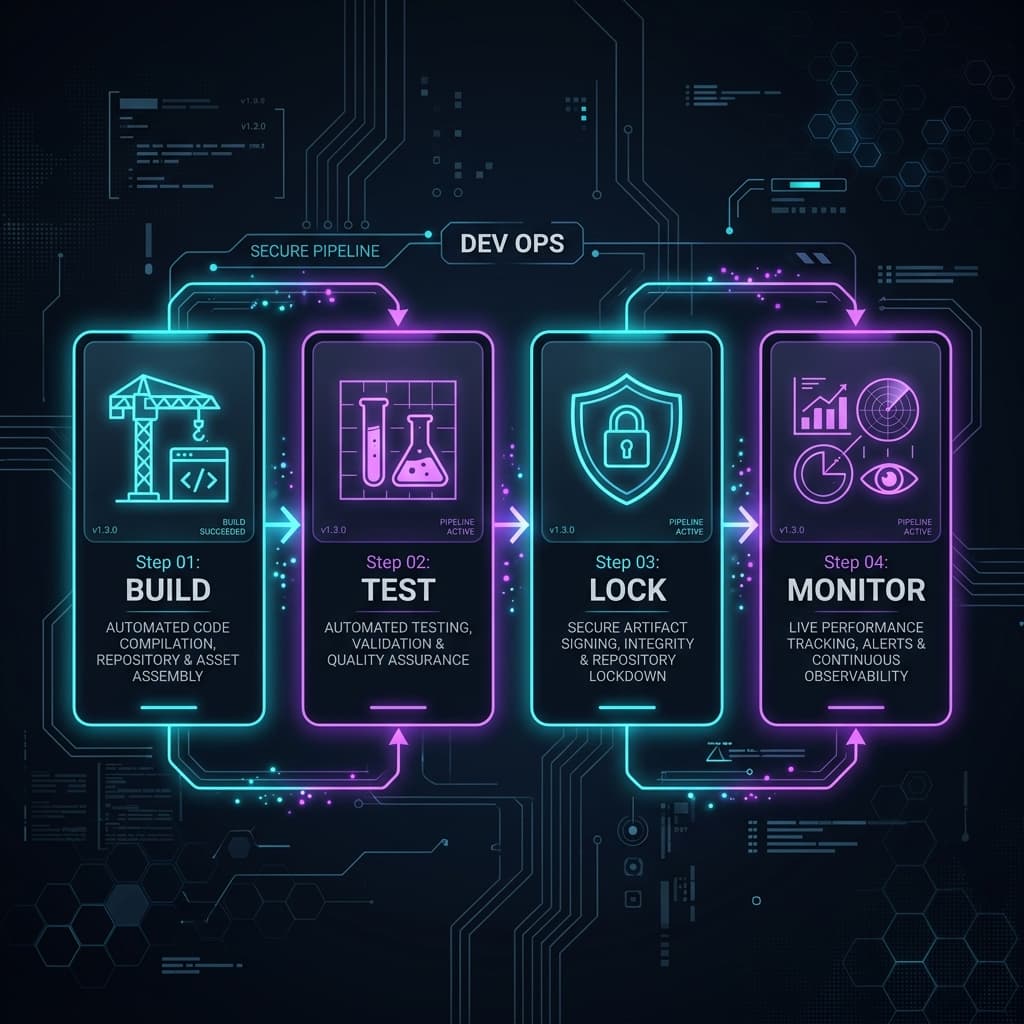
- Build: Create the automation with a defined trigger, clear AI instructions and an expected output. Don't connect it to production data yet.
- Test: Run it manually 10 to 20 times with real data from your actual use case. Review every output. Look for edge cases where the output is wrong or empty. Fix the prompts and trigger conditions until the outputs are consistently good.
- Lock: Once the automation is producing consistent outputs, document exactly what it does, what it's connected to and what a correct output looks like. This documentation is your reference point for when something breaks later.
- Monitor: Set up a simple monitoring routine. A weekly check that each automation ran and produced valid outputs. An alert if a workflow hasn't fired in its expected window. A monthly prompt review to check if the AI's instructions still match the inputs it's receiving.
Most setups invest heavily in Build and skip Test, Lock and Monitor entirely. The two-week wall is the result.
What a Reliable AI Agent Setup Looks Like Week by Week
| Week | What You Do | What the System Does |
|---|---|---|
| Week 1 | Build and test manually. Review every output. | Runs in test mode only. |
| Week 2 | Approve every output before it executes. | Runs with human in loop. |
| Week 3 | Sample-check 20% of outputs. Fix patterns. | Runs with light oversight. |
| Week 4 | Move to autonomous for consistent tasks. Keep approval for external outputs. | Mostly autonomous. |
| Month 2+ | Weekly monitoring. Monthly prompt review. | Self-running with checks. |
This timeline isn't slow — it's the difference between a system that runs for two weeks and one that runs for two years.
Common Mistakes That Cause AI Agents to Fail
- Setting it and forgetting it: AI automation is not a fire-and-forget system in the first 90 days. It requires active calibration. Plan for 30 minutes per week of maintenance during setup.
- Connecting too many tools: Every integration is a liability. The more tools in your chain, the more maintenance it requires. Keep stacks lean.
- Not logging what the AI is doing: If you can't see what your automation produced and when, you can't fix it. Always output logs somewhere visible.
- Writing prompts once and never touching them: Your business changes. Your leads change. Your content needs change. Prompts that were right in week one are often wrong by week eight. Build in a monthly prompt review.
- Automating tasks you haven't done manually first: If you haven't done something well manually, you can't write instructions for an AI to do it. Automate tasks you understand deeply, not tasks you're hoping AI will figure out for you.
Action Plan: Fix Your Broken System This Week
- Monday: Run the audit. List every automation, last run date, last 5 outputs.
- Tuesday: Identify which failure pattern applies to each broken workflow.
- Wednesday: Fix the highest-priority failure — usually the one causing the most silent failures.
- Thursday: Document the fixed workflows. What it does, what a correct output looks like, what to check if it breaks.
- Friday: Set up monitoring. A simple weekly check calendar event with a checklist for each automation.
Don't rebuild everything at once. Fix the highest-value automation first, stabilize it, then move to the next. A system with two reliable automations is worth more than eight unreliable ones.
Frequently Asked Questions
Why do AI automations stop working after a few weeks?
The most common reasons are brittle trigger conditions that break when inputs change, AI prompts that no longer match the current context and integration failures where one tool in the chain updates its format. Most failures are predictable and fixable.
How do I know if my AI agent is still running correctly?
Check the last-run timestamp and review recent outputs. If you can't see either of these, your first step is adding output logging to your workflow. A weekly 10-minute audit — checking that each automation fired and produced valid outputs — is the minimum monitoring you need.
What's the most common reason AI workflows break?
Brittle triggers and outdated prompts. A trigger that depends on a specific text string or format will break when that format changes. A prompt written for one set of inputs will produce wrong outputs when the inputs change.
How often should I check on my AI automation?
Weekly during the first 90 days. After that, monthly prompt reviews and quarterly system audits are usually sufficient if you have basic monitoring in place.
Can Claude CoWork run without supervision?
For clearly defined, internally-facing tasks — file organization, report generation, data processing — yes, with weekly monitoring. For anything client-facing or externally distributed, keep a human approval step until you've verified consistent quality over at least 60 days.
What's the difference between an AI that fails and one that's just slow?
A slow AI is producing outputs but taking longer than expected — usually a tool latency or queue issue. A failing AI is either producing wrong outputs or no outputs. Both need investigation, but failure is higher priority than latency.
How do I make my AI agent more reliable?
Simplify the trigger conditions, clarify the AI's instructions, reduce the number of integrations in the chain and add output logging and weekly monitoring. Reliability comes from simplicity and visibility, not from more complex automation.
Should I automate everything or start small?
Start small. Pick the single highest-frequency, most repetitive task in your workflow and automate that one thing well. Once it's stable and delivering consistent value, expand. Automating too much at once creates a maintenance burden that collapses the whole system.
What monitoring tools do I need for AI agents?
For most small businesses, you don't need dedicated monitoring tools. A shared Google Sheet or Notion log where each automation records its last run and output, reviewed weekly, is enough. Add a calendar event for the weekly check.
How many AI workflows should a small business run at once?
Start with three to five. That's enough to see meaningful time savings without creating unmanageable maintenance overhead. Add new automations one at a time, only after existing ones are stable and monitored.
Related Reading
- How to Build an AI Content Automation System for Small Business
- How to Automate Lead Follow-Up With AI
- AI Marketing Automation for Solopreneurs
AgentMinds specializes in building AI automation systems that stay working — not just impressive demos. If your current setup keeps breaking, that's a solvable problem.