Human-in-the-Loop AI: The Practical Framework for Knowing When to Automate and When to Supervise
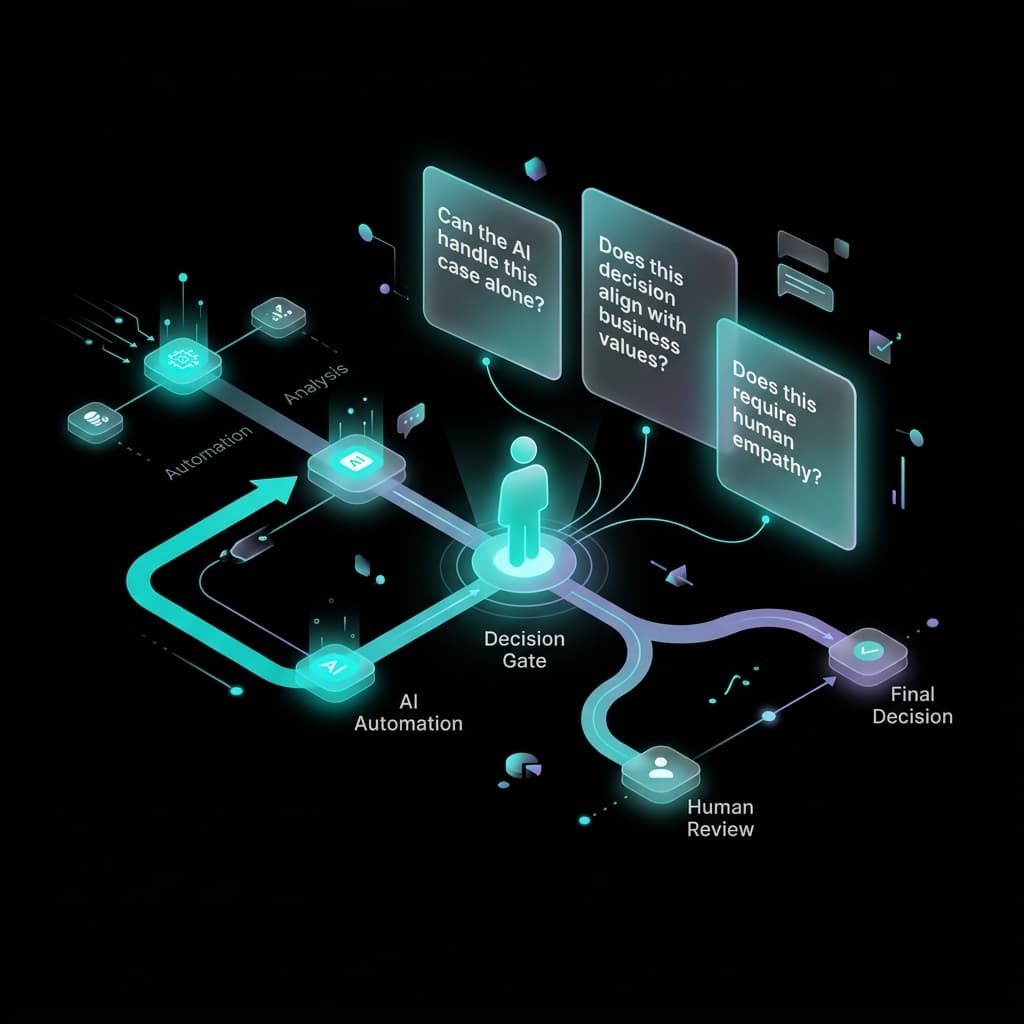
Human-in-the-loop (HITL) AI means keeping a human in the review or approval process before an AI-generated output affects a customer, a financial commitment, or your business reputation. The rule for small businesses: if the output is reversible and low-stakes, automate it fully. If it's irreversible, customer-facing, involves a factual claim, or could commit resources — a human reviews it first.
Why “Automate Everything” Is the Wrong Goal
The pitch for AI automation has a gravitational pull: the more you automate, the more time you save. This is true in a narrow sense. But the AI automation projects that save the most time in the long run are not the most automated — they're the most reliably designed.
In 2026, 95% of AI marketing projects fail to deliver expected ROI (MIT). The leading cause isn't the AI itself — it's implementation decisions: specifically, automating workflows that weren't ready for full automation and removing human review from outputs that needed it.
95%
of AI marketing projects fail to deliver expected ROI
MIT, 2026 — the cause is almost always implementation decisions, not the AI.
This isn't just a performance problem. It's a compounding one. The more you've automated, the harder it is to catch failures. An AI that sends a wrong email at 9am is a problem. An AI that runs 200 emails per week with no review process is a disaster waiting to be discovered.
The operating model that consistently outperforms both extremes is human-in-the-loop design: an intentional architecture where AI handles execution and humans approve the decisions that matter.
The Two Failure Categories That Cost Small Businesses Most
Type 1: Output Quality Failures
The AI produces something technically correct but wrong for your business — off-brand, factually inaccurate, misaligned with the customer's specific situation. These failures are often invisible at the time of output. They only become apparent when a customer replies, a deal falls through, or content gets flagged.
Type 2: Execution Failures
The automation runs, but the result isn't what the trigger intended. The most dangerous version: the system reports success while producing outputs that missed the objective entirely. A lead follow-up that ran 43 times with the wrong template. An email campaign that deployed without the personalization field populated.
Both failure types share a common root: the AI had no information about what "good" looked like for that specific output and no human was positioned to catch it before it went live. The human-in-the-loop framework is not about fixing the AI — it's about designing the right oversight architecture around it.
The 3-Question Human-in-the-Loop Decision Framework
Apply this test to every workflow before you decide whether it needs human review:
Is the output reversible?
If the AI drafts a document, generates an image, or creates an email that goes into a drafts folder — cost of error is low. Full automation is usually appropriate.
If the output is irreversible — an email sent to 500 customers, a social post published, a contract filed, a payment initiated — human review before execution is the right call.
Decision Rule: Irreversible + consequential = human review required.
Does the output make a claim on your behalf?
Internal documents, data formatting, scheduling — things where your name is not attached to a public factual claim.
Marketing emails, sales proposals, chatbot responses, ad copy, blog posts, customer updates — anything where your name is attached to a factual claim or commitment.
Decision Rule: Customer-facing + claim or commitment = human review required.
Can the AI access your full context for this decision?
If all the relevant context — customer history, preferences, current policies — is in your context system, the AI can produce a reliable output.
If the decision requires a specific customer history, a relationship nuance, a pending negotiation, or a policy change from last week — a human with that context needs to review.
Decision Rule: Output requires context the AI doesn't have = human review required.
⚠️ If the answer to all three questions is “no” — reversible, internal or non-claim and full context available — full automation is likely safe. Any “yes” answer is a trigger for human oversight.
The 5 Workflow Types and Where the Human Checkpoint Belongs
Content Creation
Blog Posts, Social, EmailsDraft generation, keyword research, first-pass outlines, internal documentation, repurposing existing content.
Final publish decision, customer-facing email send, ad copy activation, anything with factual claims.
Between AI output and distribution. The AI drafts; a human reviews before it goes live.
& Qualification
Prospecting & RoutingData enrichment, initial scoring, routing to the right bucket, research compilation on a prospect.
Personalized outreach sent in your name, lead disqualification, outreach that implies a specific human read their situation.
Between AI qualification and outreach. The AI prepares the research and draft message; you approve before it sends.
Customer Service & Chatbots
Support & TriageFAQ responses, appointment booking, order status updates, initial triage.
Complaints with financial implications, escalations, complex or ambiguous questions.
Escalation triggers. Define the conditions that automatically route to a human — the EU AI Act also requires customers can always request human escalation.
Administrative & Internal Operations
Scheduling, Data, FinanceScheduling, reminders, data formatting, internal summaries, CRM updates, invoice drafting.
Contract generation before signature, payment instructions, anything that commits budget.
Before execution on financial or commitment-related actions. Internal operations have more latitude — but financial and legal actions need human sign-off.
Data Analysis & Reporting
Metrics & InsightsData aggregation, metric tracking, dashboard updates, standard report generation.
Insights that will drive strategy decisions, reports shared with clients or investors, analysis where AI could be working with incomplete data.
Between automated report generation and decision-making. The AI produces the report; a human reads it before acting.
How to Implement a Review Checkpoint Without Creating a Bottleneck
The most common objection to human-in-the-loop design is that it defeats the purpose of automation. This is only true if you design the checkpoint wrong. A well-designed checkpoint adds 2–5 minutes of human time to an output that would otherwise take 30–120 minutes to produce from scratch.
Separate generation from approval.
The AI generates asynchronously. The human reviews and approves on a schedule. For email campaigns, this might mean the AI produces all drafts by 9am Monday; you spend 15 minutes reviewing and approving before the week starts. You're not reviewing in real-time — you're reviewing in batch.
Use a standard review checklist.
Give reviewers a 5-item checklist: (1) factual claims accurate? (2) tone appropriate? (3) format correct? (4) no confidential or incorrect data included? (5) CTA or next step correct? A checklist makes reviews faster and more consistent.
Design for exception, not exhaustive review.
Not all outputs need the same depth of review. Customer emails sent in your name need a full read. Internal summaries probably just need a skim. Tier your review intensity by the stakes of the output.
Log the review.
One of the EU AI Act's practical requirements is that human review can be demonstrated if questioned. A simple log — date, output type, reviewer, outcome — satisfies this and becomes valuable data over time.
What a Well-Designed HITL Workflow Actually Looks Like
Here's a concrete example for a service business using AI for client proposal generation:
Lead submits an inquiry form
Claude enriches lead data, pulls relevant examples from past projects, generates a draft proposal
Draft lands in your review queue — a shared Notion doc, a draft email, or a staging environment
You spend 5 minutes reviewing: verify pricing, check project scope, confirm tone is right for this lead
You approve → the proposal goes out under your name
Log: date, lead name, reviewer, approved/modified
5–7 min
Total human time per proposal
45–90 min
Time Claude saved you
Review adds a trivial fraction of overhead while eliminating the risk of sending a wrong or off-brand proposal.
Common Mistakes When Designing Human Oversight Into AI Workflows
❌ Making every output require full review.
This creates bottlenecks that make automation feel like more work than manual. Use the 3-question framework to right-size oversight to risk.
❌ Assigning review to whoever is available.
Human oversight works when the reviewer is accountable and qualified. A review done by someone who doesn't understand the customer or context won't catch what needs to be caught. Name the responsible reviewer for each content type.
❌ Reviewing the output but not the prompt or context.
If the same type of output keeps needing correction, the issue isn't the review — it's the upstream context system. Track corrections and trace them back to missing or incorrect context inputs.
❌ Treating review as optional when you're busy.
The weeks you're busiest are the weeks automation is running most. Those are the weeks you most need the review checkpoint. If review is consistently getting skipped, simplify the checklist — not the oversight itself.
❌ Not documenting reviews.
A review that doesn't leave a trace is a review that didn't happen for compliance purposes. A lightweight log — date, output type, reviewer, outcome — takes 30 seconds and protects you under the EU AI Act and any customer dispute.
Action Plan: Audit Your Current Automations This Week
List every AI workflow currently running.
Include tools: Claude, ChatGPT, Zapier automations, AI-powered email sequences, chatbots, CRM AI features. Write down what each one does and what the output looks like.
Apply the 3-question test to each workflow.
Mark each one: fully automated (safe), HITL required, or uncertain.
Design the checkpoint for every "HITL required" workflow.
Where does the human enter? What do they review? Who is the named reviewer? How do they approve or flag the output?
Create your review log.
A Google Sheet with five columns is enough: Date | Workflow | Reviewer | Approved or Modified | Notes.
Run each HITL workflow through one full cycle.
Note what the reviewer catches. Adjust your context system for anything that keeps coming back wrong.
Total time investment: ~2 hours. Outcome: every automation you run has a defined oversight design — and you have the documentation to demonstrate it under the EU AI Act.
Frequently Asked Questions
What is human-in-the-loop AI?
Human-in-the-loop AI (HITL) is an automation design pattern where an AI handles execution of a task but a human reviews, approves, or adjusts the output before it takes effect — particularly before it reaches a customer, triggers a financial action, or commits a business resource. It's the middle path between manual and fully autonomous operation.
When should I use human-in-the-loop AI vs. full automation?
Use HITL when the output is irreversible, customer-facing, involves a factual claim or commitment, or requires context the AI doesn't have. Full automation is appropriate for reversible, internal, or low-stakes outputs where the AI has the full context it needs.
Does human-in-the-loop AI slow down automation?
Designed correctly, no. The AI still handles the slow, labor-intensive part. Human review is scoped to what humans are actually good at: verifying accuracy, context fit and tone. A 5-minute review on a proposal that took Claude 3 minutes to draft still saves you 40+ minutes compared to writing it yourself.
What workflows should never run fully automated?
At minimum: personalized outreach sent under your name, customer-facing complaint responses, any output with financial figures or commitments, chatbot responses to escalated situations and content with specific factual claims. The 3-question framework identifies these rigorously.
What does the EU AI Act require for human oversight?
EU AI Act Article 14 requires that deployers of AI systems implement human oversight measures allowing humans to understand, monitor and intervene in AI operation. For small businesses, the practical minimum is: a named responsible reviewer for customer-facing AI outputs, a log of reviews and a process for customers to escalate to a human.
What is the difference between human-in-the-loop and human-on-the-loop?
Human-in-the-loop means a human must actively review and approve the output before it proceeds. Human-on-the-loop means the AI runs autonomously but a human monitors and can intervene. HITL adds friction; HOTL adds visibility. For high-stakes outputs, HITL is the right design. For lower-stakes, well-established workflows, HOTL may be sufficient.
Can small businesses with one or two people realistically implement HITL?
Yes — single-operator businesses often have an advantage here because the person building the workflow and the person reviewing the output are the same person. Batch review — reviewing all outputs from a workflow in a 15-minute morning session — makes HITL sustainable for a one-person operation.
What tools support human-in-the-loop approval steps?
Claude Projects and Claude CoWork support staged output review natively. Zapier and Make both offer approval steps that pause an automation pending a human action. Notion, Airtable and Google Sheets serve as effective low-overhead review queues. The tool matters less than the process design.
Ready to design the right oversight architecture for your AI workflows?
Mapping your specific workflows to the right HITL design is a core part of AgentMinds' workflow design service. We build the oversight architecture so you're not guessing which outputs need a human and which can run safely on their own.
Book a Discovery Call