The Operational AI Playbook: How to Turn Claude Workflows Into a System That Runs Itself
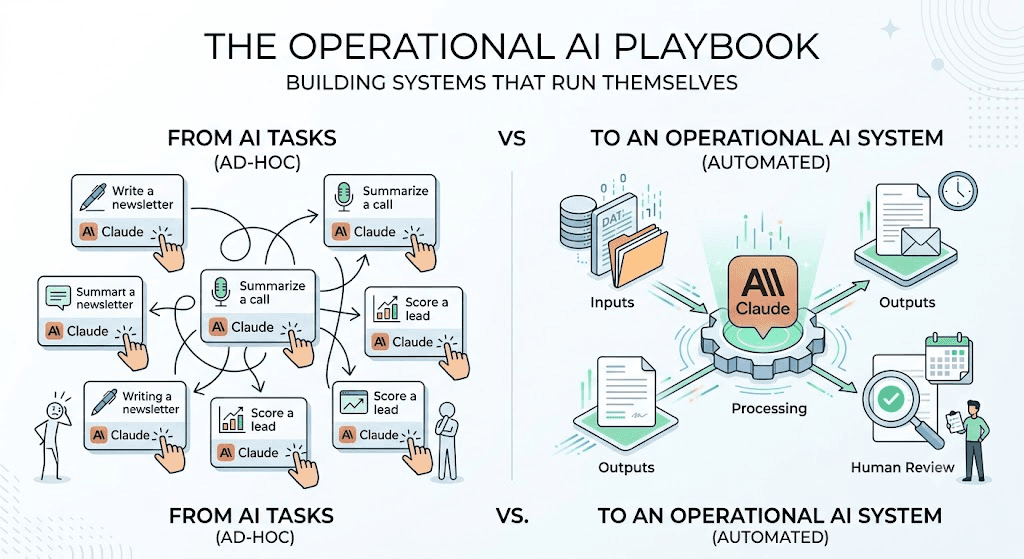
Direct answer: An operational AI system is not a collection of Claude prompts you run when you remember to. It is a structured sequence of inputs, processing steps, outputs and human review checkpoints that executes on a schedule and produces consistent results without daily decision-making from you. Most small businesses are using Claude for tasks. The ones pulling ahead are using it for systems. The difference is the difference between doing one thing faster and doing entire categories of work without thinking about them.
Why One-Off AI Tasks Are Costing You More Than You Realize
Here is the pattern most small businesses fall into: they discover Claude can write a good first draft of a newsletter. So they open Claude each Monday, paste in their notes and produce a newsletter. Then they discover it can summarize sales call recordings. So they paste those in too, when they remember. Then they find it can score inbound leads. So they do that manually, periodically, when the lead volume makes it feel worth the effort.
After a few months, they are using Claude for maybe ten different things — none of which are connected, all of which require them to initiate and oversee each task individually. The result is that Claude saves them time on each task while adding a new recurring task (running Claude) to their list. That is not a system. That is a faster version of manual work.
The businesses actually getting compounding value from AI automation in 2026 are the ones who made a different decision: they stopped asking "what can Claude do for me?" and started asking "what workflow can I build that runs without me initiating it every time?"
The answer to that question is an operational AI system.
What an Operational AI System Actually Is
An operational AI system has four components. You cannot skip any of them and still have a system — what you have instead is an assisted manual workflow, which is useful but not compounding.
Layer 1: Inputs
Every system needs a consistent, structured source of data or content to work with. For a system, this might be a CRM field that updates when a new lead comes in. For a content system, it might be a shared Google Doc where you drop rough notes each week. For a client reporting system, it might be a weekly export from your project management tool. The key characteristic of a good input layer is that it requires minimal effort from you to maintain — ideally zero.
Layer 2: Processing
This is where Claude does the core work: generating, transforming, analyzing, classifying, or summarizing the input. The processing layer must be clearly specified. Claude needs to know what it is doing, what format the output should take, what constraints to apply and what "done" looks like. This is where most small business AI systems are underdeveloped — the prompt exists but the specification is vague enough that outputs vary significantly session to session.
Layer 3: Outputs
A well-built output layer deposits the result somewhere useful and in the right format — a drafted email in your email client, an updated CRM field, a document in your shared drive, a social post in your scheduling tool. When the output layer requires you to manually collect the result and move it somewhere, you have re-introduced the exact overhead the system was supposed to eliminate.
Layer 4: Review
Every operational AI system needs at least one human review checkpoint. This is not optional — it is what keeps the system from drifting, compounding errors, or producing outputs that damage client relationships before you notice. The review checkpoint should be lightweight (reviewing a weekly batch, not checking every output individually), scheduled (not ad hoc) and clearly defined (you know exactly what you are reviewing for).
Building Each Layer: A Practical Guide
Building Your Input Layer
The most reliable input layers are structured data sources with consistent formats. Here is what works well:
- For content systems: A Google Doc or Notion page where you drop raw notes, bullet points, or reference materials on a recurring schedule. The AI picks up from that document each week. You do not need to format the input carefully — you just need to put something consistent there.
- For lead processing systems: A CRM field or tag that triggers when a new lead enters. Claude can be connected to read from HubSpot, Airtable, or similar tools via Claude CoWork's integrations. The input is the lead record; the system processes it automatically on trigger.
- For client reporting systems: A weekly export or scheduled report from your project management or time-tracking tool. This can be as simple as a CSV that gets dropped in a shared folder on Monday mornings.
What to avoid: Input layers that require you to manually compile information from multiple sources each time. If the setup of inputs is itself a significant task, the system will break down the moment you get busy.
Building Your Processing Layer
The processing layer is your Claude prompt — but not just any prompt. An operational AI system prompt needs five elements:
- Role and context: Who Claude is acting as and what it knows about your business.
- Input description: What it should expect to receive and in what format.
- Task specification: Exactly what it should produce, including format, length, tone and any constraints.
- Quality criteria: What a good output looks like, stated explicitly.
- Error handling instruction: What Claude should do if the input is incomplete, ambiguous, or outside the expected format.
The single most common failure mode in small business AI processing layers is vague task specification. Claude will produce something with a vague prompt — but it will not produce consistent outputs and consistency is what makes a system.
Building Your Output Layer
The output layer is often where people stop and say "this is where I need a developer." In many cases, that is not true.
Claude CoWork can write directly to files, folders and connected applications. Claude Code can be used to create simple scripts that move outputs to the right destination automatically. For many small businesses, the simplest reliable output layer is:
- A designated folder where outputs are saved with a consistent filename convention
- A weekly review session where you batch-process those outputs (review, edit if needed, deploy)
More advanced output layers include direct API connections to your email platform, CRM, or content management system. AgentMinds can build these connections for businesses whose workflows justify them. But start with the folder approach. A simple output layer you actually use beats a complex one you built once and then had to maintain.
Building Your Review Layer
Your review layer is the quality control mechanism that keeps the system honest over time. Here is what it should include:
- A weekly review schedule: Pick a fixed time each week — 20-30 minutes — to review that week's AI outputs before they go out. Put it in your calendar. Treat it like a standing meeting you cannot skip.
- A review checklist: Know what you are checking for: factual accuracy, brand voice consistency, output completeness and any format-specific requirements. A 5-item checklist takes 30 seconds per output and catches 80% of issues.
- A drift signal: One thing that should trigger a deeper audit: if you find yourself making the same correction more than twice in a row, the system prompt needs updating, not the output. Fix the source, not the symptom.
Real-World Example: A 2-Person Consulting Firm
A 2-person consulting firm serving mid-market professional services clients was spending approximately 12 hours per week on three recurring tasks: writing weekly client updates, scoring and prioritizing inbound inquiry responses and repurposing case study content for LinkedIn.
They rebuilt these as a single operational AI system using Claude CoWork:
- Inputs: A shared Google Doc where the team drops rough bullet points for each client update by end of Thursday. A CRM tag applied to new inquiries. A dedicated folder for approved case study documents.
- Processing: Three Claude prompts — one per output type — each with complete role context, task specification, quality criteria and error handling. Each prompt references a shared "brand voice" document stored in Claude's context.
- Outputs: Client updates drafted in a Google Doc folder, labeled by client name and week. Inquiry responses drafted in a Gmail draft folder. LinkedIn posts saved in a Notion table with a status column.
- Review: A Friday 9am standing block (25 minutes) where both partners review, approve, or edit that week's outputs together before anything goes out.
The result: 12 hours of recurring task time dropped to approximately 2.5 hours — 25 minutes for inputs across the week and 25 minutes for weekly review. The system has been running for 11 weeks without a major failure. One prompt has been updated once after they caught a tone drift in the LinkedIn posts.
Common Mistakes When Building Operational AI Systems
Mistake 1: Starting with the most complex workflow.
The first workflow you automate should be the most repetitive, most clearly defined and lowest-stakes one you have — not the most impressive-sounding. Build your first system on something where a mistake is annoying but not catastrophic.
Mistake 2: Writing vague processing prompts and hoping for consistency.
Vague prompts produce variable outputs. Variable outputs require more review time. More review time erases the efficiency gain. Invest 30 extra minutes making your processing prompt specific.
Mistake 3: Skipping the review layer because the early outputs look great.
AI outputs drift over time as your business context changes, your input quality varies and Claude's behavior subtly shifts across model updates. A review layer is not optional maintenance — it is the mechanism that keeps the system calibrated.
Mistake 4: Building the output layer last and discovering it requires development resources.
Map your output destination before you build your processing layer. If getting the output where it needs to go requires significant technical work, that is important information that shapes how you design the whole system.
Mistake 5: Automating tasks you have not yet standardized.
If the task currently depends on whoever is doing it making judgment calls, automating it produces inconsistent outputs — because you are automating inconsistency. Standardize the task manually first, document the standard, then automate it.
Action Plan: Identify Your First System-Worthy Workflow
- List every recurring task you currently do with AI. Write down every time you open Claude this week and what you use it for.
- Mark the ones you do more than once a week. Frequency is the primary signal for system-worthiness.
- For each frequent task, answer three questions: Does it have a consistent input format? Does it have a clear, specifiable output? Would a failure in this workflow be low-stakes enough to catch in a weekly review?
- Choose the task that answers yes to all three. That is your first system candidate.
- Write a complete processing prompt using the five-element structure above.
- Set up the simplest possible input and output layer — a designated folder or shared doc on each end.
- Block 20 minutes in your calendar each week for review. Do not skip it for the first six weeks.
Frequently Asked Questions
1. What's the difference between using Claude for tasks vs. building a Claude workflow system?
Using Claude for tasks means you initiate each use manually — you open Claude, paste your input, run the task, collect the output. A Claude workflow system has a defined input source, a consistent processing prompt, an output destination and a review schedule. It runs on a cadence rather than requiring you to initiate it each time.
2. How do you connect multiple Claude workflows into one system?
The most straightforward approach is a shared folder or document structure where the output of one workflow becomes the input of the next. More advanced connections use Claude CoWork's integrations or simple scripts built with Claude Code to pass outputs between tools automatically.
3. What kinds of business workflows are most suitable for Claude automation?
The strongest candidates are workflows that are high-frequency, clearly defined, template-driven and lower-stakes for errors. Common examples: weekly reporting, lead scoring and triage, email draft generation from call notes, content repurposing and client update summaries.
4. How much does it cost to run an operational AI system with Claude?
Claude Pro ($20/month) or Claude for Teams ($30/user/month) covers most small business operational AI use cases. Claude CoWork is included in the desktop application. For more advanced integrations, Claude Code may require additional setup time but not additional subscription cost beyond the Claude plan.
5. How do you know when a Claude workflow is ready to run without daily supervision?
When you have run it manually five or more times and the output has been consistently good and when you have written and tested your processing prompt fully, you are ready to move to weekly review cadence. Do not skip the manual phase — it is how you find the edge cases before they run unattended.
6. What's the minimum viable operational AI system for a solopreneur?
One workflow, one prompt, one input source, one output folder and one 20-minute weekly review block. That is a complete operational AI system. You can expand from there, but this is the functional minimum.
7. How do you build human review checkpoints into an AI workflow without killing efficiency?
Batch your review instead of reviewing outputs one at a time as they are produced. A weekly 20-minute review of seven days' worth of outputs is far more efficient than a daily 5-minute check that breaks your focus. The key is a clear checklist so review time is consistent and predictable.
8. What happens when a Claude workflow breaks — and how do you catch it early?
Your weekly review is the primary catch mechanism. Additionally, build a simple signal into your output layer — if an output folder is empty when it should have content, that is a flag. If output documents are shorter than expected, that is a flag. Treat these as system health signals, not individual errors.
9. Can you use Claude CoWork to build workflows, or do you need Claude Code?
Claude CoWork is sufficient for most small business operational AI systems. Claude Code adds power for more complex integrations — connecting to APIs, automating file processing, or building custom scripts — but is not required to build effective workflow systems.
10. What's the best first workflow to automate for a small business just starting with Claude?
Weekly internal reporting or meeting-to-action-items conversion. Both have consistent input formats, clear output specifications and low stakes for errors. They also produce immediate time savings that build confidence for expanding the system.
Ready to automate your marketing?
Stop building ad-hoc tasks and start building operational systems. Let AgentMinds handle the complex integrations.
Book a Discovery Call