How to Automate Your Sales Pipeline With AI for Small Business
You're Losing Deals — Not Because Your Product Is Wrong, But Because Your Follow-Up Is Broken
Here's what a leaky sales pipeline looks like in practice.
A lead fills out your contact form on Tuesday. You're in back-to-back calls. You see the notification, tell yourself you'll reply later and by Thursday the lead has gone cold. Or they signed with someone who responded in two hours.
This isn't a discipline problem. It's a systems problem.
The average small business owner loses 30–40% of warm leads simply due to slow or inconsistent follow-up. And most "solutions" — HubSpot, Pipedrive, Salesforce — cost $50–150/month per user and take weeks to configure properly.
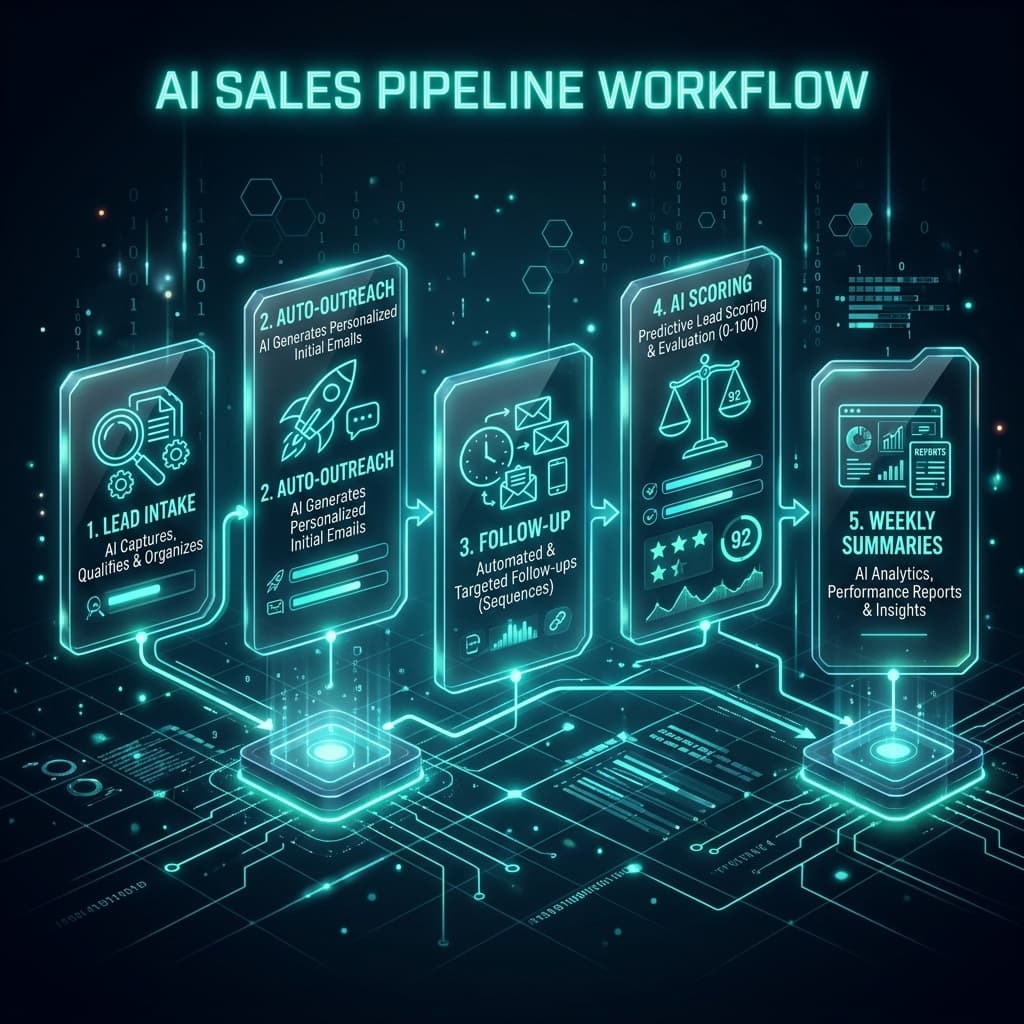
There's a better way. With the right AI tools and a simple no-code workflow, you can automate your entire sales pipeline — intake, qualification, follow-up and deal tracking — and cut the manual overhead by 50–60%. No enterprise CRM required.
This guide shows you exactly how to build it in six steps.
Why Manual Sales Pipelines Break Down for Small Businesses
Traditional CRMs were built for sales teams. When you're a solo founder, a two-person agency, or a small business wearing ten hats, the problem isn't awareness — it's bandwidth.
The three failure points in manual pipelines are always the same:
- Delayed response. Research consistently shows that leads contacted within five minutes are 9× more likely to convert than those contacted after an hour. Most small businesses respond in hours — or days.
- Inconsistent follow-up. After the first outreach, most deals die in silence. There's no system forcing the next touchpoint, so it doesn't happen.
- No visibility. Without a central view of where every lead stands, deals fall through the cracks. You're managing the pipeline in your inbox — which is not a pipeline.
AI solves all three. Here's the six-step system.
The 6-Step AI Sales Pipeline Automation System
Step 1 — Map Your Pipeline Stages
Before you automate anything, get clear on your pipeline. A typical small business sales pipeline has five stages:
- New Lead — just came in, not yet contacted
- Contacted — first outreach sent
- Qualified — confirmed they're a fit
- Proposal Sent — offer or quote delivered
- Closed / Won / Lost — deal resolved
Write these stages down. Every automation you build in the next five steps maps to a transition between them.
AI move: Paste your current lead intake and sales process into Claude and ask it to identify where deals are most likely to stall. Most businesses find 80% of their losses happen at the same one or two stages — which tells you exactly where to automate first.
Step 2 — Centralize Lead Intake With an AI-Powered Form
Your pipeline can't be automated if leads arrive in five different places — email, Instagram DMs, WhatsApp, your website form and referrals.
Pick one intake point. The simplest setup:
- Tally or Typeform — build a qualification form that captures name, contact info, business type, budget range and timeline
- Connect to Google Sheets via Zapier — every new submission lands in a central lead tracker automatically
- Tag with status "New Lead" — so you always have a live view of every inbound contact
This single step eliminates the most common pipeline failure: leads getting lost across inboxes and notification feeds.
For businesses with existing forms: Zapier can pull new entries from any existing contact form (Gravity Forms, Contact Form 7, Squarespace forms) and route them into the same central sheet — no rebuild needed.
Step 3 — Automate First-Contact With AI Within 5 Minutes
Speed of response is the most high-leverage change you can make to your close rate.
Set up a Zapier automation that triggers the moment a new lead lands in your Google Sheet:
- Zapier detects the new row
- It pulls the lead's name, business type and stated need from the form
- It passes those details to Claude or ChatGPT via their API (or use Zapier's built-in AI action)
- Claude generates a personalized first-contact email using a prompt template you've written once
- Zapier sends the email from Gmail automatically
Sample prompt template for Step 3:
The output lands in the lead's inbox within minutes of their form submission. Your response time goes from hours to under five minutes — automatically.
Step 4 — Build Stage-Based Follow-Up Sequences
Most deals don't close on the first touchpoint. The key is having a consistent, stage-aware follow-up system that runs without you managing it manually.
The structure:
- Day 1: AI-personalized first contact (Step 3)
- Day 3: If no reply — follow-up email referencing their original problem
- Day 7: If still no reply — a different angle (case study, result, or resource)
- Day 14: Final check-in and soft close
Build this as a multi-step Zapier automation using delay steps and conditional logic:
- If the lead's status in Google Sheets is still "Contacted" after 3 days → send follow-up email
- If status updates to "Qualified" → pause the sequence and trigger a different workflow (proposal follow-up)
- If status updates to "Closed" → stop all sequences and log the outcome
Each email in the sequence is AI-generated from a template prompt. You write the prompts once. The system sends the right message at the right time, every time.
Tools needed: Zapier (multi-step automation), Google Sheets (status tracking), Claude or OpenAI API.
This step alone recaptures 20–30% of leads that would otherwise go cold simply due to missed follow-ups.
Step 5 — Use AI to Qualify Leads and Prioritize Your Time
Not every lead deserves equal attention. AI can score and prioritize your pipeline so you focus on deals most likely to close.
How to set this up:
After the first reply from a lead, copy their response and pass it to Claude with a qualification prompt:
Run this every time a lead responds. Update their score in the Google Sheet. Use conditional formatting to flag high-priority leads in red.
Automated version: Set up a Zapier step that triggers when a new Gmail reply arrives from a known lead, passes the reply to Claude and writes the score back into the Google Sheet automatically.
You now have a prioritized, AI-scored pipeline without a single manual update.
Step 6 — Generate Weekly Pipeline Summaries With AI
The final piece is visibility. Once a week, have AI produce a plain-language summary of your pipeline status so you know exactly where every deal stands and what needs to move.
The workflow:
- Export your Google Sheet data (or let Zapier pull it automatically on a schedule)
- Pass it to Claude with this prompt:
Receive the summary by email or in Notion automatically via Zapier.
This replaces the mental overhead of manually reviewing your pipeline. You get a clear, actionable snapshot in your inbox every Monday morning — without opening a single spreadsheet.
Real-World Example: Freelance Consultant Recovers 12 Leads Per Month
A freelance marketing consultant was managing all leads through Gmail labels and a sticky note system. An average of 10–15 warm leads per month received no follow-up after the first email because they were buried in the inbox.
After building the system above:
- All leads route through a single Tally form into Google Sheets
- Zapier sends a personalized first-contact email within 3 minutes of every form submission
- A 4-email follow-up sequence runs automatically over 14 days
- Claude scores each lead after their first reply and writes it back into the sheet
- A weekly pipeline summary arrives every Monday with clear next actions
Result: Response time dropped from 18 hours to under 5 minutes. 12 previously cold leads converted within the first 60 days. Monthly revenue increased by 34%.
Time saved: 6+ hours per week — reclaimed from manual inbox management, follow-up writing and deal tracking.
Tools Summary
| Task | Tool |
|---|---|
| Lead intake centralization | Tally, Typeform, Google Forms + Zapier |
| Pipeline tracking | Google Sheets |
| AI email personalization | Claude API, OpenAI API, or Zapier AI |
| Follow-up sequence automation | Zapier (multi-step) |
| Lead qualification scoring | Claude (prompt-based) |
| Weekly pipeline summaries | Claude + Zapier + Gmail/Notion |
Frequently Asked Questions
Do I need a CRM to automate my sales pipeline with AI?
No. The system described in this guide uses Google Sheets as your pipeline database and Zapier as your automation layer. You get 80% of the value of a CRM at a fraction of the cost — and it takes an afternoon to set up.
How does AI personalize emails if it doesn't know my leads?
The personalization comes from the data in your intake form. When a lead describes their business type, their specific problem and their timeline, Claude uses those details to write an email that feels specific to them — not generic.
What if a lead replies and I want to take over manually?
You can update the lead's status in Google Sheets to "Active — Manual" and add a conditional to your Zapier automation that pauses all sequences when that status is set. You stay in control.
How long does this system take to build?
Most small businesses can set up all six steps in 3–5 hours. The majority of that time is writing your prompt templates once. After initial setup, the system runs continuously without maintenance.
Can I use this system for an agency managing multiple clients?
Yes — duplicate the Google Sheet and Zapier workflows for each client. The core setup scales horizontally with minimal additional effort per client.
The Bottom Line
A leaky sales pipeline isn't a motivation problem — it's a systems problem.
AI doesn't replace your sales judgment. It handles the mechanical parts: the first-contact email, the follow-up sequence, the lead scoring, the pipeline summary. The parts that currently eat hours of your week and still get done inconsistently.
Build this system once. Let it run. Focus your attention on the high-score leads that are actually ready to close.
If you're losing deals to slow follow-up or inconsistent outreach, this is the highest-ROI automation you can implement this week.
Want this built for you?
AgentMinds builds AI and sales automation systems for small businesses, startups and agencies. We handle the setup — you keep the time savings.
Book a Consultation🎉 Free Lead Magnet: AI Sales Pipeline Audit Checklist
Get a 5-minute audit to identify which pipeline stages are automation-ready, plus a pre-built Google Sheets deal tracker template with built-in status labels and AI scoring column.
Download the Checklist & Template