How to Automate LinkedIn Outreach With AI for Small Businesses (2026)
You're Writing LinkedIn Messages One by One — And It's Draining You
You open LinkedIn. You find a promising prospect. You write a connection request. You wait. They accept. You write a follow-up. You wait again. Maybe you send one more message. And then you move on to the next person and repeat the whole thing from scratch.
If you're doing LinkedIn outreach manually, you're spending 8 to 15 hours a week on a process that produces inconsistent results.
The bigger problem: most of that time is spent on tasks that follow a predictable pattern — researching profiles, personalizing one or two lines, sending the same sequence with small variations. That's exactly what AI is built to handle.
Small businesses that automate LinkedIn outreach with AI are cutting that manual effort by 50 to 60 percent — while sending more messages, maintaining higher personalization and booking more calls.
This guide walks you through how to build that system yourself, step by step, with no-code tools and AI prompts you can set up this week.
Why LinkedIn Outreach Is Broken Without Automation
Manual LinkedIn outreach fails most small businesses not because the channel doesn't work — it does — but because the process is unsustainable.
Here's what goes wrong:
- Volume collapses. Writing 10 to 20 personalized messages a day is exhausting. Most people burn out within two weeks and stop reaching out entirely.
- Consistency dies. Without a structured follow-up system, hot leads go cold because you forgot to send message two or three.
- Personalization is shallow. When you're tired, "personalization" becomes copying the person's job title into a template. That's not personalization — it's noise.
- No data, no improvement. Without tracking which messages get replies, you're guessing what works.
An AI-powered outreach system solves all four problems. Here's how to build one.
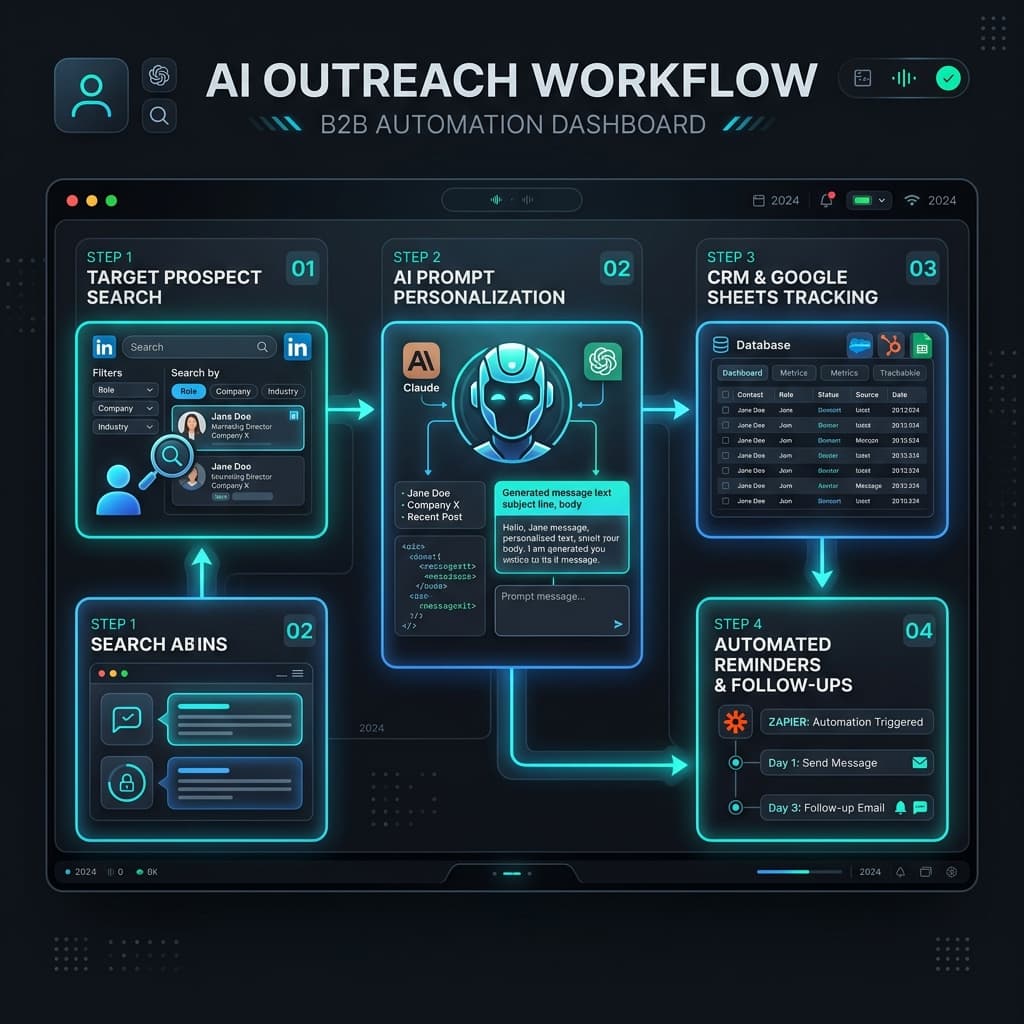
How to Automate LinkedIn Outreach With AI: A 6-Step System
Step 1 — Define Your Ideal Connection Profile
Before you automate anything, you need to know exactly who you're targeting. Vague targeting produces vague results.
Write out your Ideal Connection Profile. Be specific:
- Job title(s): Who actually has the problem you solve? (e.g., "Marketing Manager," "Founder," "Head of Growth")
- Company size: 1–10 employees? 10–50? 50–200?
- Industry: Be specific. "B2B SaaS founders" beats "business owners."
- Location: Are you targeting a specific geography or going global?
- Trigger signals: What indicates they're likely to need your service right now? (e.g., recently hired, running ads, posted about a pain point)
Once this is documented, LinkedIn's native search filters become a precise targeting engine — even on a free account. This profile also feeds directly into your AI personalization prompts in Step 4.
Step 2 — Build Your Outreach Message Framework
Before you use AI to write messages, you need a proven framework. AI amplifies what works — it doesn't create strategy from nothing.
A high-performing LinkedIn outreach sequence for small businesses looks like this:
- Message 1 — Connection Request (under 200 characters): Mention one specific, real thing about their profile or recent activity. No pitch. No ask. Just a genuine reason you wanted to connect.
- Message 2 — Value-First Follow-Up (sent 24–48 hours after acceptance): Briefly introduce what you do, reference their specific situation and offer something useful with zero commitment required — a relevant tip, a short insight, or a resource.
- Message 3 — Soft Ask (sent 4–5 days after Message 2, if no reply): One clear, low-friction ask. "Would it make sense to have a 15-minute call?" Not a full pitch deck. Not "I'd love to tell you more about everything we offer."
- Message 4 — Final Bump (sent 5–7 days after Message 3, if no reply): Short. Acknowledges they're probably busy. Leaves the door open without pressure. This one often converts people who ignored the earlier messages.
Document this framework in a Google Doc or Notion page. It becomes the input for your AI writing prompts.
Step 3 — Use AI to Generate Personalized Messages at Scale
This is where the 50 to 60 percent time savings happens.
Instead of writing each message from scratch, you use AI to generate personalized variations from your framework — tailored to each prospect's profile, role, industry and any signals you've noted.
Tool to use: Claude or ChatGPT
Here's an example prompt structure for your connection request:
For the follow-up messages, feed the AI your framework and the prospect's details:
Running 20 to 30 of these prompts takes 20 minutes. Writing those same messages manually takes 3 to 4 hours. Save your best prompt versions. Build a small library of 5 to 8 prompts that work across your most common prospect types.
Step 4 — Set Up a Tracking System for Prospects and Replies
Automation without tracking is just noise. You need a simple system to monitor where every prospect is in your sequence and flag who needs a follow-up.
Tool to use: Google Sheets (free) or Notion
Build a basic outreach tracker with these columns:
| Name | Company | Title | Connection Sent | Connected? | Message 2 Sent | Replied? | Notes | Stage |
|---|---|---|---|---|---|---|---|---|
| John Doe | Acme Inc | Founder | 2026-05-26 | Yes | Pending | No | Fast growing startup | Message 2 |
Use color labels or dropdown menus to mark each stage. This takes 30 minutes to build and saves hours of mental overhead trying to remember who's where.
Once you have this in place, connect it to a simple Zapier automation that notifies you — via email or Slack — when a prospect accepts your connection request. That's your trigger to send Message 2.
Step 5 — Automate Follow-Up Timing With Zapier
The reason most LinkedIn outreach sequences fail is not the messages — it's the follow-up. People forget to send Message 3. They get busy. The sequence dies.
You can fix this with a simple Zapier workflow that automates follow-up reminders based on your tracker.
How it works:
- When a prospect's status in your Google Sheet changes to "Connected," Zapier starts a timer.
- After 48 hours, Zapier sends you an automated reminder (email or Slack) to send Message 2.
- When Message 2 status is marked "Sent," a new 4-day timer starts.
- If no reply is logged within 4 days, Zapier sends a reminder to send Message 3.
This doesn't send LinkedIn messages automatically — LinkedIn's terms of service restrict fully automated sending — but it removes the mental overhead of tracking follow-up timing manually. You spend 10 minutes a day executing reminders rather than 2 to 3 hours managing a chaotic inbox.
Tools needed: Google Sheets + Zapier (starter plan, around $20/month)
Step 6 — Review, Score and Improve Weekly
The final step is what separates businesses that get consistent results from those who plateau.
Once a week — set a 20-minute block — review your tracker and answer these questions:
- What is my connection acceptance rate? (target: 25–40%)
- What is my reply rate after connection? (target: 10–20%)
- Which message variation is getting the most replies?
- Which industries or titles are responding best?
- What objections am I seeing repeatedly?
Feed this data back into your AI prompts. Update the message framework. Kill what isn't working. Double down on what is. Over 4 to 6 weeks, this loop produces a highly tuned outreach system that improves automatically — without adding any more manual effort.
A Real-World Example
Here's what this system looks like in practice for a freelance marketing consultant targeting SaaS founders.
Monday morning: They use LinkedIn search to pull a list of 25 SaaS founders at companies with 10–50 employees. They paste each profile summary into Claude with their connection request prompt. In 25 minutes, they have 25 personalized connection requests ready.
Tuesday to Thursday: They monitor their tracker. For every acceptance, Zapier fires a reminder. They send Message 2 in under 5 minutes using their AI follow-up prompt.
Following week: Three replies come in. One books a call. The AI weekly prompt reviews their tracker data and suggests which message variation drove the most engagement.
Total active working time: around 90 minutes per week. Previously, this same outreach took 8 to 10 hours.
That's a 55 to 60 percent reduction in time — with a higher volume of personalized messages sent.
Tools Summary
| Step | Tool | Cost |
|---|---|---|
| Profile targeting | LinkedIn (free or Sales Navigator) | Free / $99/month |
| Message writing | Claude or ChatGPT | Free / $20/month |
| Prospect tracking | Google Sheets or Notion | Free |
| Follow-up reminders | Zapier (Starter) | ~$20/month |
| Weekly review | Claude or ChatGPT | Included above |
Total cost for a functional system: $20 to $40/month.
Frequently Asked Questions
Is automating LinkedIn outreach against LinkedIn's terms of service?
Fully automated sending tools (bots that send messages without any human involvement) violate LinkedIn's Terms of Service and can result in account restrictions. This system is different — it uses AI to prepare and personalize messages and automation to manage follow-up timing, but the actual sending is always done by you. That keeps you compliant while still dramatically reducing the time involved.
How many connection requests can I send per day on LinkedIn?
LinkedIn limits connection requests to around 100 per week on standard accounts (roughly 15 to 20 per day). Sales Navigator provides slightly more flexibility. Staying within these limits is important — aggressive sending can flag your account. With this system, 10 to 15 high-quality, personalized requests per day is a sustainable and effective volume.
How long does it take to see results from LinkedIn outreach?
Most small businesses see their first replies within 1 to 2 weeks of consistent outreach. Meaningful lead flow typically builds over 4 to 8 weeks as you refine your message framework and target profile. The businesses that stick with the weekly review loop in Step 6 see the fastest improvement.
Do I need Sales Navigator for this to work?
No. LinkedIn's free search is sufficient to target by job title, industry, location and company size. Sales Navigator adds more advanced filters and higher volume capability, but it's optional — especially when you're starting out.
Can AI really personalize messages that feel human?
Yes, with the right prompts. The key is feeding AI specific, real information about the prospect — not just their name and title. When your prompt includes their recent post, the company's growth stage, or a specific problem their role typically faces, the output reads like something written by a thoughtful human. Generic prompts produce generic messages. Specific prompts produce messages that get replies.
The Bottom Line
LinkedIn outreach works. What doesn't work is doing it manually at scale.
A properly built AI outreach system — with clear targeting, AI-generated personalization, a simple tracking sheet and Zapier-powered follow-up reminders — lets a small business run a consistent, professional outreach operation in 60 to 90 minutes a week instead of 8 to 10 hours.
That's 50 to 60 percent of your time back. Spent on delivering work, not chasing leads.
The system takes about half a day to set up. The results compound every week you run it.
If you want to see how AgentMinds can build this system for your business, book a free automation audit.