How to Automate Client Onboarding With AI for Small Businesses (2026)
Every New Client Is Costing You More Time Than You Think
You land a new client. Great news. Then reality sets in.
You have to send them a welcome email, fire off a contract, collect intake information, schedule a kickoff call, set up their project folder, send access credentials and follow up if anything gets missed.
That's 3 to 5 hours of manual, repetitive work — for every single client.
If you sign 4 new clients a month, that's 20 hours gone. Not on delivering results. On admin.
Here's the truth most agencies and freelancers don't want to face: your onboarding process is the first impression of how you run your business — and right now, it's probably running on manual effort, follow-up memory and copy-pasted emails.
The fix isn't to hire someone. The fix is to build an AI-powered onboarding system that handles all of it automatically.
This guide shows you how to automate client onboarding with AI for your small business — step by step, using tools you can set up without writing a single line of code.
Why Client Onboarding Is the Highest-ROI Process to Automate
Before we get into the steps, here's why onboarding specifically is worth automating first:
- It's repetitive. Every client goes through the same sequence. Same emails, same forms, same folder setup. That's the ideal profile for automation.
- It's high-stakes. A slow or disorganized onboarding loses client trust before you've done any real work. An automated system makes you look professional and reliable from day one.
- The time savings are immediate. Once your system is live, you can onboard a client in minutes instead of hours. Businesses that automate onboarding report cutting the process time by 50 to 60 percent — without reducing quality.
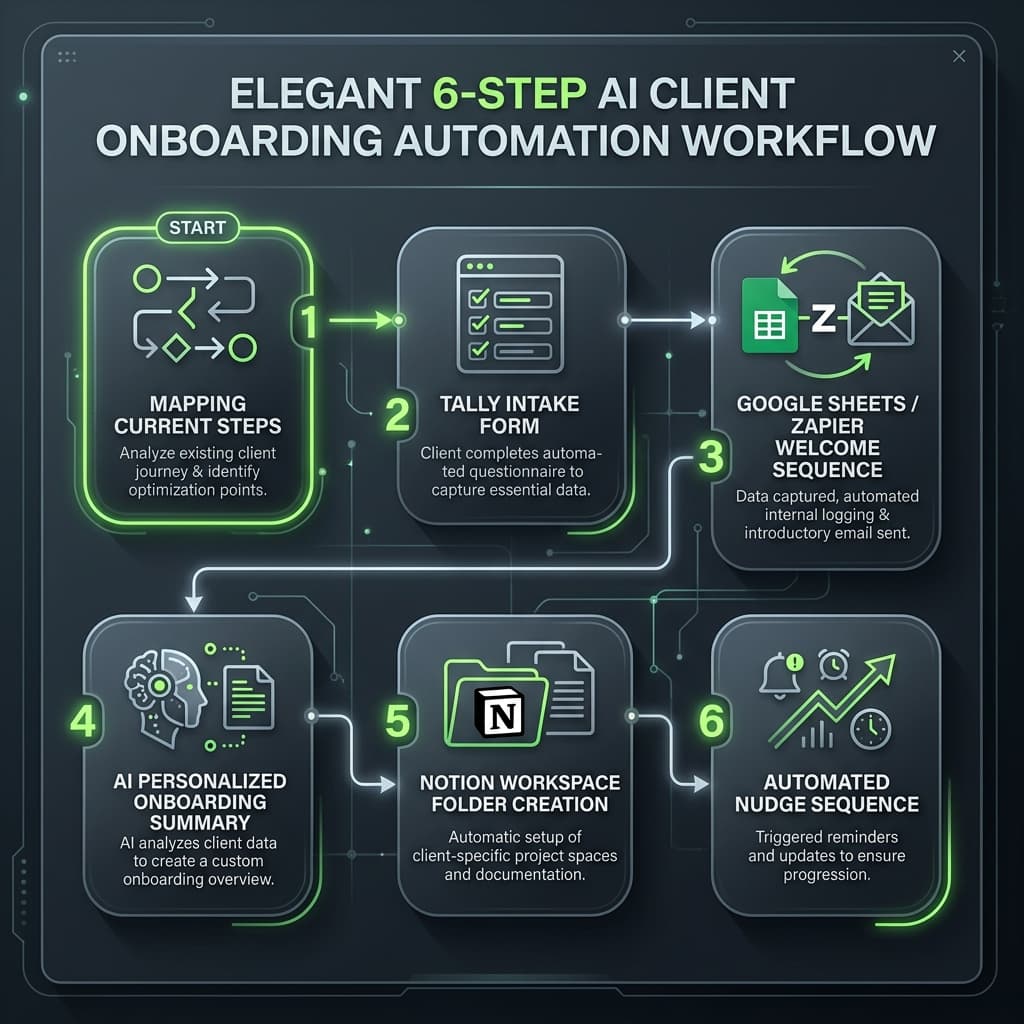
How to Automate Client Onboarding With AI: A 6-Step System
Step 1 — Map Out Your Current Onboarding Steps
Before you automate anything, you need to know exactly what you're automating.
Write out every step you currently take when a new client signs on. Include things you do manually that you might not think of as "steps" — like copying their details into a spreadsheet or sending a "looking forward to working with you" email.
A typical small business onboarding sequence looks like this:
- Send welcome email
- Send contract for signature
- Collect client intake form (goals, login details, brand assets)
- Schedule kickoff call
- Create project folder and shared workspace
- Send onboarding summary / next steps email
- Follow up if intake form isn't completed
Every item on that list can be automated. Your goal in this step is just to get them all written down in one place.
Step 2 — Set Up an Automated Intake Form
Your intake form is the entry point of the entire system. When a client fills it out, it should trigger everything else.
Tool to use: Tally (free) or Typeform
Build a form that collects everything you need in one shot:
- Business name, website and contact info
- Goals for the engagement
- Any logins, assets, or files they need to share
- Preferred communication method and availability
- Kickoff call availability (time slots or a Calendly link)
Make the form specific to your service. The more you front-load information gathering, the less back-and-forth you need later.
Once a client submits the form, Tally can automatically notify you and feed the data into a Google Sheet — which becomes the trigger for the rest of your system.
Step 3 — Automate Your Welcome and Contract Sequence
The moment a new client is confirmed, your AI system should send a welcome email automatically — without you touching it.
Tool to use: Zapier + Gmail (or your email provider)
Set up a Zap that:
- Triggers when a new row appears in your Google Sheet (from the intake form or from a signed contract in DocuSign / PandaDoc)
- Sends a personalized welcome email using the client's name and project details pulled from the form
- Attaches or links the contract for signature if it hasn't been signed yet
For the email itself, use an AI tool like Claude or ChatGPT to write a warm, professional welcome email template with merge fields for the client's name, project type and kickoff date. You write it once. The system sends it every time.
You can run the same logic for your contract: once a project is confirmed, Zapier auto-sends the contract via DocuSign or HelloSign — no manual steps required.
Step 4 — Use AI to Personalize the Onboarding Experience
This is where you go from "automated" to "impressive."
Once you have the client's intake data, use Claude or ChatGPT to generate a personalized onboarding summary specific to that client. Feed in their goals, their business type and the service they signed up for — and have AI produce a 1-page onboarding brief that feels custom.
Sample AI prompt:
Then paste the intake form data below the prompt. The output takes 20 seconds and reads like it was written specifically for them — because it was.
Add this summary to your kickoff call agenda or drop it into their shared project folder automatically.
Step 5 — Automate Project Folder and Workspace Setup
Every new client needs a home base. Manually duplicating folders and granting access takes time. Automate it.
Tools to use: Notion + Zapier, or Google Drive + Zapier
Set up a Notion template (or Google Drive folder structure) that you want every new client to have. Then use Zapier to:
- Duplicate the template automatically when a new client is added
- Rename the workspace using the client's name (pulled from your Google Sheet)
- Optionally, send the client a link to their workspace as part of the welcome sequence
This step alone saves 20 to 30 minutes per client. At scale, it becomes significant.
Step 6 — Build an Automated Follow-Up and Nudge Sequence
Not every client completes their intake form immediately. Not every client responds to the first email. You need a system that follows up for you — without you remembering to do it.
Tool to use: Zapier + Gmail
Set up a simple 2-step follow-up sequence:
- Day 1: Welcome email sent automatically (from Step 3)
- Day 3: If intake form is still incomplete, auto-send a friendly nudge: "Hey [Name], just checking in — when you get a chance, completing the intake form will help us hit the ground running on Day 1."
- Day 6: If still no response, a final nudge goes out with a direct link to the form and a note to reach out if they need help
Once the form is submitted, the sequence stops automatically. No manual tracking, no forgotten follow-ups.
What This System Looks Like End-to-End
Client confirms → Zapier detects new row in Google Sheet → Welcome email + contract sent automatically → Intake form link included → Client submits form → AI generates personalized onboarding summary → Project workspace created automatically → Kickoff call scheduled via Calendly link in welcome email → Follow-up nudges fire if form is not completed → You show up to the kickoff call fully prepared, with zero admin work done manually.
The entire sequence runs in the background. Your job is to show up for the kickoff call and deliver results.
Real-World Example
A freelance brand consultant was spending 4 to 5 hours manually onboarding each new client. After building this system using Tally, Zapier, Google Sheets, Claude and Notion, her onboarding time dropped to under 30 minutes per client.
The tasks that remained? Reviewing the AI-generated onboarding summary before the kickoff call and customizing it if needed. Everything else — intake, welcome email, contract, folder setup, follow-ups — ran automatically.
She onboards 5 to 6 clients per month. The system saves her 20 to 25 hours every month. That's time now spent on client work and business development instead of admin.
Tools You Need to Build This System
| Tool | Purpose | Cost |
|---|---|---|
| Tally or Typeform | Client intake form | Free / $29/mo |
| Zapier | Workflow automation | Free / $20/mo |
| Google Sheets | Central data hub | Free |
| Claude or ChatGPT | AI personalization and email writing | $20/mo |
| Notion | Project workspace templates | Free |
| DocuSign / HelloSign / PandaDoc | Contract automation | $10–25/mo |
| Calendly | Automated kickoff call scheduling | Free / $10/mo |
Total cost estimate: $50 to $75/month for a fully automated onboarding system. Compare that to the hours you're spending doing it manually.
Frequently Asked Questions
What is AI client onboarding automation?
AI client onboarding automation is the process of using AI tools and no-code workflow software to automatically handle the repetitive tasks involved in welcoming a new client — including sending welcome emails, collecting intake information, generating personalized summaries, setting up project workspaces and sending follow-up reminders.
How much time can I save by automating client onboarding?
Most small businesses and freelancers save 50 to 60 percent of their onboarding time after setting up an automated system. A process that previously took 3 to 5 hours per client can typically be reduced to 20 to 40 minutes of review and oversight.
Do I need to know how to code to automate client onboarding?
No. The entire system described in this guide uses no-code tools — Zapier, Tally, Google Sheets, Notion and Claude. No technical background is required. If you can follow a step-by-step guide and use a spreadsheet, you can build this system.
What's the best tool to automate client onboarding for small businesses?
There's no single "best" tool — the system works because the tools connect together. The core stack is Tally (forms) + Zapier (automation) + Google Sheets (data) + Claude (AI personalization) + Notion (workspace). This combination gives you a complete, automated onboarding pipeline without expensive CRM software.
How long does it take to set up this system?
Most small businesses can set up a basic version of this system in a weekend — typically 4 to 8 hours of setup time. Once it's live, it runs automatically and rarely needs changes unless your onboarding process changes significantly.
The Bottom Line
Manual client onboarding is one of the biggest hidden time drains in a small business. It's repetitive, it's error-prone and it scales poorly as you grow.
An AI-powered onboarding system changes that. Set it up once and every new client gets a fast, professional, personalized experience — while you spend your time on the work that actually grows your business.
The tools exist. The process is straightforward. The only thing standing between you and 50 to 60 percent less onboarding time is building the system.
Ready to Automate?
AgentMinds helps small businesses, agencies and founders replace manual marketing and operations work with AI systems. If you want to see how automation could work across your entire business — not just onboarding — explore what we build at AgentMinds.ai.
Explore AI Automation