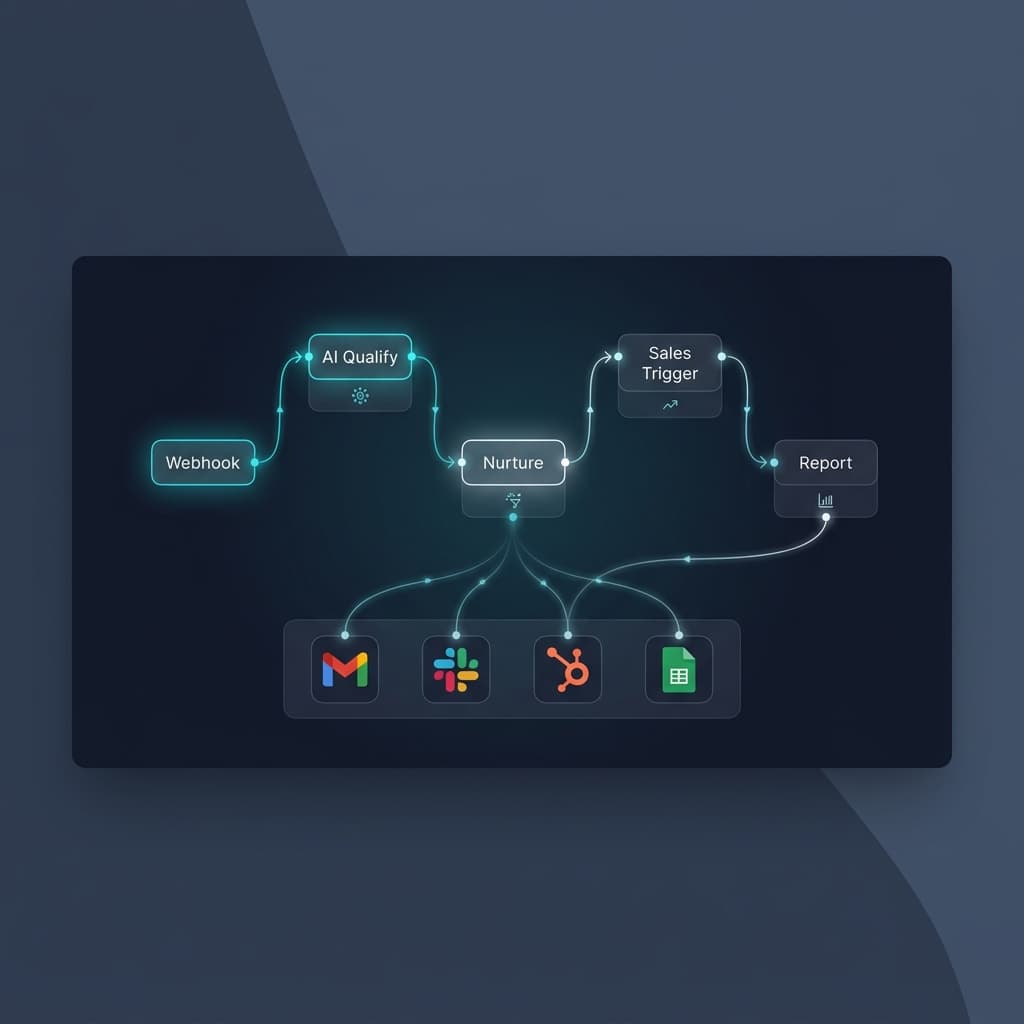
Most marketing automation guides give you a diagram and call it a day.
This one is different. I am going to walk you through exactly how we automate marketing funnels using n8n — the same approach we have used across 60+ client builds. Real workflows. Real logic. Real results.
If you have heard of n8n but are not sure where to start, or if you have started and hit a wall, this is the guide I wish existed when I began.
What is n8n and why use it for marketing automation?
n8n is an open-source workflow automation tool. Think of it like Zapier, but you own it, it runs on your server (or cloud) and it can handle genuinely complex logic, not just "if this, then that."
For marketing automation specifically, n8n is powerful because:
- →It connects to any API, your CRM, email tool, LinkedIn, Google Sheets, Notion, Slack, anything
- →You can run AI models (GPT-4, Claude, Perplexity) directly inside your workflows
- →You can self-host it, so your data stays yours
- →One-time setup cost, no per-task billing like Zapier
The downside: there is a learning curve. It takes a few hours to understand the node-based logic. But once it clicks, you can build workflows in an afternoon that would take a developer days to code from scratch.
The marketing funnel we are automating
Before touching n8n, map out what you actually need. Here is the funnel structure we use for most clients:
Each stage has specific automation opportunities. We will go through each.
Stage 1: Lead capture automation
The first thing most teams automate is getting leads into one place.
What this looks like in n8n:
Set up a webhook node as your trigger. Every time a lead fills out your form (Typeform, Tally, your website), the webhook fires and the workflow begins.
From there, your first n8n workflow does three things simultaneously:
- →Adds the lead to your CRM (HubSpot, Airtable, Google Sheets)
- →Sends a Slack notification to your team
- →Triggers the welcome email sequence
// Node structure
Webhook (trigger)
→ Set node (format the data)
→ Split In Batches
→ HTTP Request (CRM API)
→ Slack (team notification)
→ Gmail/SMTP (welcome email)
One webhook trigger. Three parallel actions. Takes about 45 minutes to build the first time.
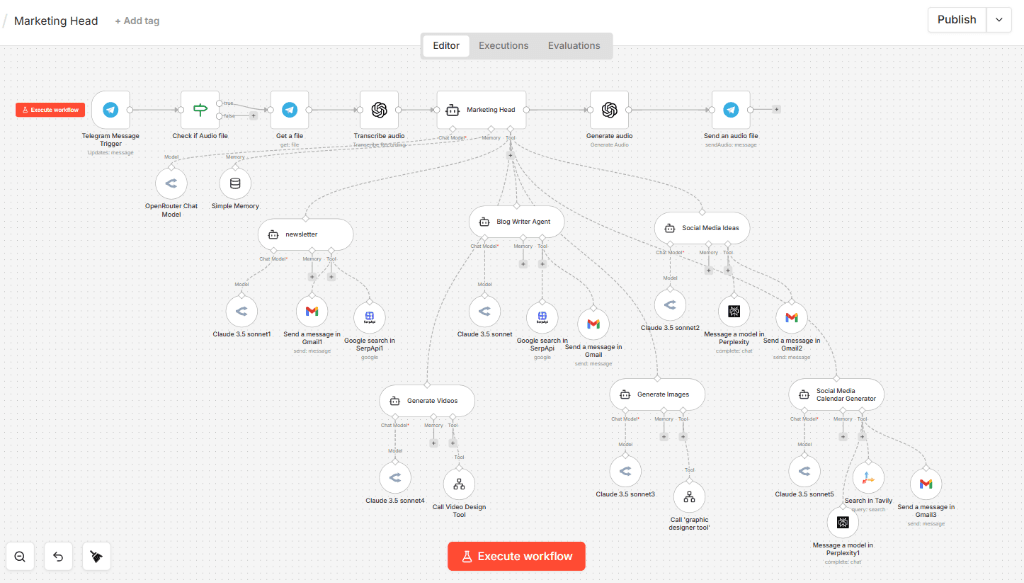
A real n8n marketing automation workflow, Marketing Head agent orchestrating newsletter, blog writer, social media, video and image generation agents simultaneously.
Stage 2: Lead qualification with AI
This is where n8n separates itself from Zapier. You can run a GPT-4 or Claude node inside the workflow to score and qualify leads before your team ever sees them.
Here is what our qualification workflow does:
The lead data, company name, role, problem they mentioned, website URL, gets passed to an AI node. The prompt looks something like this:
// AI qualification prompt
You are a lead qualification agent for AgentMinds.
Given this lead data: [lead_data]
Score this lead 1-10 based on:
- Job title relevance (founder/marketing lead = high score)
- Company size (5-200 employees = ideal)
- Problem fit (automation/needs = high score)
Return JSON: {"score": X, "reason": "...", "priority": "high/medium/low"}
The workflow then routes based on score:
Score 7–10
Hot lead
Immediate Slack alert, priority email sequence
Score 4–6
Warm lead
Standard nurture sequence
Score 1–3
Low priority
Monthly digest only
This single node saves 2-3 hours per week of manual lead triage. For a client generating 100+ leads/month, that compounds fast.
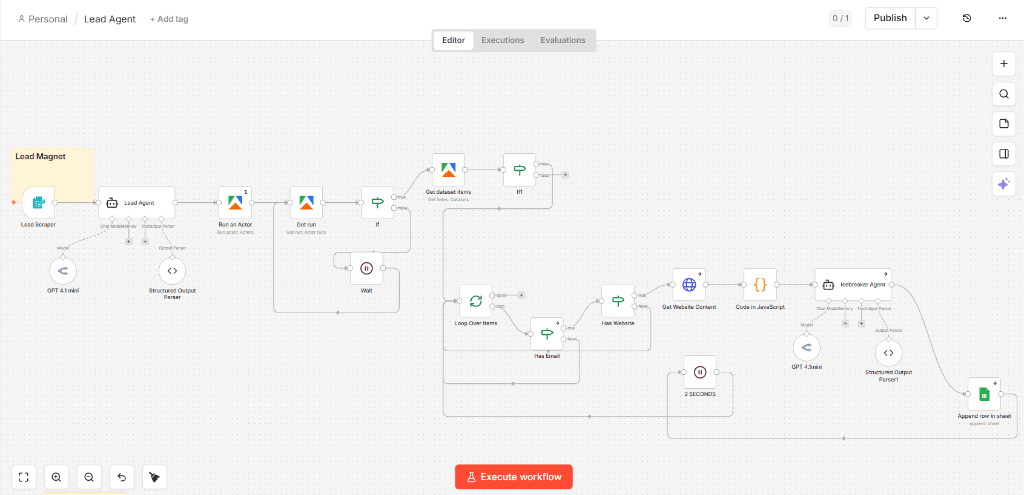
Our actual n8n Lead Agent workflow, scraping leads, running qualification logic, checking for emails and websites, generating personalised icebreakers and appending qualified leads to Google Sheets.
Stage 3: Nurture sequence automation
Nurture is where most teams have the biggest gap. They capture leads well. They close deals when someone shows interest. But the middle — the 80% of leads who aren't ready to buy yet — gets ignored.
Here is a simple 5-touch nurture workflow in n8n:
Lead added to 'Nurture' list in your CRM
Welcome email (sent immediately via SMTP node)
Educational email, a relevant blog post or case study (scheduled with a Wait node)
Personalised check-in, the AI node writes a personalised 3-line email based on their form answers
Social proof email, client result or testimonial
Direct CTA — 'Are you ready to automate your marketing? Here is how to get started.'
The Wait node is key. Between each step, you set a delay: 3 days, 7 days, whatever your sequence needs. n8n holds the execution and resumes automatically.
The Day 7 personalisation looks like this:
"Hey Arjun, noticed you mentioned as your main challenge — we actually built a workflow last month that automated exactly this for a SaaS founder in Bangalore. Worth sharing?"
That kind of email gets replied to. A generic one does not.
Stage 4: Sales trigger automation
You do not want your sales team manually checking who is engaged. You want n8n to tell them.
Set up a trigger that watches for buying signals:
- →Lead opened the pricing page (via your analytics webhook)
- →Lead clicked the 'Unlock Growth' link but did not sign up
- →Lead visited the site 3+ times in a week
When any of these fire, n8n automatically:
- →Tags the lead as 'Sales Ready' in your CRM
- →Creates a task for follow-up
- →Sends a Slack message: 'Arjun from [Company] just hit the pricing page for the third time this week.'
Your team closes deals. They do not do detective work.
Stage 5: Reporting automation
This is the one most people skip and they regret it.
Every Monday morning, a scheduled workflow runs in n8n. It:
- →Pulls data from your CRM (new leads, conversion rates, pipeline value)
- →Pulls data from Google Analytics (traffic, top pages)
- →Pulls email stats (open rates, clicks)
- →Formats everything into a Notion table or Google Sheet
- →Sends a summary Slack message: 'This week: 23 new leads, 4 qualified. Top source: blog.'
Five minutes to set up the first time. Every Monday morning, the report is waiting for you.
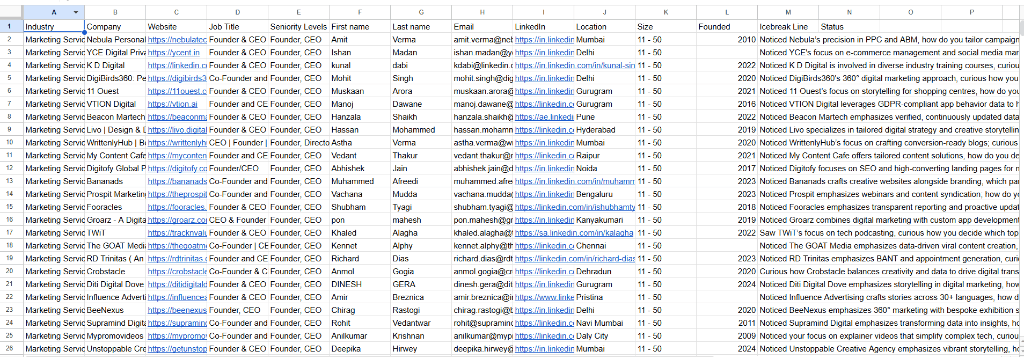
Leads automatically qualified and written to Google Sheets by our n8n Lead Agent — complete with personalised icebreaker lines, LinkedIn URLs, contact details and a status column ready for outreach.
The full funnel workflow: what it looks like running
Once all five stages are connected, here is what happens when a new lead comes in — automatically, without you touching anything:
Lead fills form
n8n fires immediately: CRM updated, Slack notification sent, welcome email delivered
AI qualification runs
Lead scores 8/10, tagged 'Hot', priority alert sent
Nurture begins
Personalised welcome email sequence kicks off automatically
Buying signal
Lead opens the pricing page — sales trigger fires, task created
Weekly report
Report includes this lead in the week's summary
From Sunday night to Monday morning, the lead has been captured, qualified, nurtured and flagged for follow-up. Zero human involvement.
That is n8n marketing automation done right.
Common mistakes I see when teams try to build this themselves
Mistake 1: Building too much at once
Start with Stage 1 only. Get leads into your CRM reliably. Then add qualification. Then nurture. One stage at a time.
Mistake 2: Skipping error handling
When an API fails (and they do), your workflow needs to know what to do. Add error nodes from day one.
Mistake 3: Not testing with real data
n8n's test mode is great, but run your first 10 real leads through manually while watching the execution. You will catch edge cases you did not anticipate.
Mistake 4: No documentation
Your future self — or your team — needs to know what each workflow does. Add notes to your nodes.
How long does this take to build?
Learning n8n from scratch
2–4 weeks
To have a working basic funnel
Already know n8n
3–5 days
For a clean, production-ready setup
Want someone to build it
1–2 weeks
We can have a full funnel live — unlock our growth tools
FAQ
Do I need a developer to use n8n?
No, but it helps to be comfortable with concepts like APIs, webhooks and JSON. If you have used Zapier before, you will pick up n8n's logic in a few hours.
Can n8n handle high volumes?
Yes. We have built workflows processing thousands of records per day. Self-hosted n8n on a decent VPS handles this easily.
What's the cost?
n8n Community Edition is free, self-hosted. n8n Cloud starts at $20/month. Compare that to Zapier at $49–$299/month with per-task billing.
What if I want someone to build this for me?
That's exactly what we do at AgentMinds. View our services or unlock our growth tools.
Ready to automate your marketing funnel?
AgentMinds builds custom n8n marketing automation workflows for startups and growing businesses. 60+ agents built. Full funnel — lead capture to reporting — live in 1–2 weeks.
AgentMinds builds custom n8n marketing automation workflows for startups and growing businesses. 60+ agents built.